> For the complete documentation index, see [llms.txt](https://docs.reportpundit.com/llms.txt). Markdown versions of documentation pages are available by appending `.md` to page URLs; this page is available as [Markdown](https://docs.reportpundit.com/knowledge-base/report-creation/customized-reports/custom-fields/calculated-fields.md).
# Calculated Columns (Fields)
Learn more about Calculated Columns , an exclusive feature for Shopify merchants by Report Pundit that simplifies custom data acquisition.
Calculated columns let you add data fields to your reports tailored to your needs. You can add custom formulas using existing data during creation, and can modify it later as required.
Calculated columns deliver data that you won't find otherwise, enabling deep insights into any store metric for enhanced data-driven decisions.
## :point\_right:Steps to Create a Calculated Field
Once you've enabled the custom column feature for your Report Pundit account, follow these steps to create your desired columns:
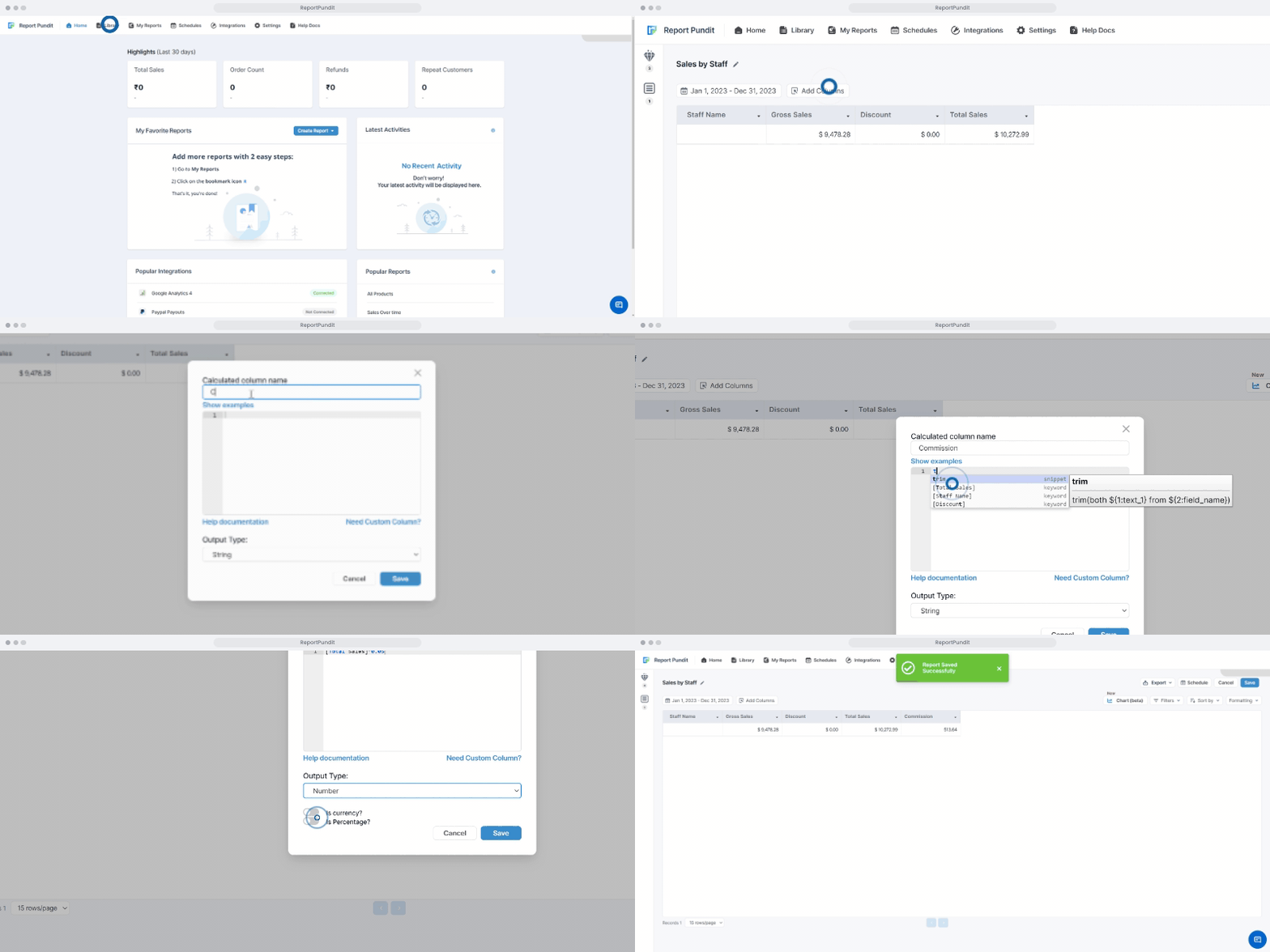
1. Open your desired report by clicking on **Library** or **My Reports** in the navigation bar.
2. Click on the **Add Columns** button above the report's data table. You should see a pop-up menu with data columns.
3. Click on the **Add Custom Column** option at the bottom-right corner of the menu. You'll see a drop-down menu letting you choose between adding Calculated or Static field. Click on the **Calculated Field** option.
4. A new box will pop-up with sections to add column name and formula. Give the column a meaningful name and add your desired calculation.
**Defining Field Calculations**
* Use the available functions and operators to build your calculation. The function needs to be written in **PostgreSQL**.
* Only columns that already exist in the report can be used for calculation. Make sure you add all relevant columns to the report before creating a calculated field. For example, to calculate "**Sales,**" you can use the formula: \[Ordered Quantity] \* \[Product Price].
Select the desired **Output Type** (*String, Number, DateTime, or Boolean*) using the drop-down menu at the bottom.
* Format (Optional): If the **Numeric** Output type is selected, you can choose to apply formatting to the calculated column (e.g., currency, percentage).
5. Once done, click on **Save** to create the column or **Cancel** to exit without creating it.
{% hint style="info" %}
**Hint:** Type a keyword to receive suggestions to add into the editor.
{% endhint %}
{% hint style="danger" %}
**Important:** You should save the report to retain the calculated column.
{% endhint %}
{% hint style="info" %}
If you need help creating a custom column, click on **Request Custom Column** from the **Manage Column** screen or the **Need Custom Column** from the **Calculated Column** screen, describe your requirement and submit request. The Report Pundit support team will create the custom column for you.
You can also contact the support team for any custom column related issues or clarifications.
{% endhint %}
{% hint style="info" %}
**Note:** Click on **Help** **Documentation** to view various functions that you can use. It is recommended to use this feature with basic knowledge of **PostgreSQL.** To learn more about PostgresSQL syntax, please [visit this link](https://www.tutorialspoint.com/postgresql/postgresql_syntax.htm).
{% endhint %}
There are various calculations and commands which can be executed via custom fields.
{% tabs %}
{% tab title="String" %}
These are a few commands available under the **'String'** format, with syntax:
* Character Length
```
char_length([field_name])
```
* All characters in Lower Case
```
lower(string)
```
* All letters in Upper Case
```
upper(string)
```
* String Concatenation 2
```
'String: ' || integer
```
{% endtab %}
{% tab title="Numbers" %}
These are a few commands available under the **'Numbers'** format, with syntax:
* Adding two or more field values
```
[field_name1] + [field_name2]
```
* Subtracting two or more field values
```
[field_name1] - [field_name2]
```
* Multiplying two or more field values
```
[field_name1] * [field_name2]
```
* Dividing two field values
```
[field_name1] / [field_name2]
```
* **Limit** or **truncate** the decimal values to 'n' number of decimal places.
```
trunc([field_name],n)
```
{% endtab %}
{% tab title="Boolean" %}
These are a few commands available under the **'Boolean'** format, with syntax.
* Greater Than **( > ) :** Returns 'true' if first condition is greater than second condition, else return 'false'
```
[field_name1] > [field_name2]
```
* Lesser Than **( < ) :** Returns 'true' if the first condition is greater than the second condition, else return 'false'
```
[field_name1] < [field_name2]
```
* Greater than or Equal to **( >= ) :** Returns 'true' if the first condition is greater than or equal to the second condition, else return 'false'
```
[field_name1] >= [field_name2]
```
* Lesser than or Equal to **( <= ) :** Returns 'true' if the first condition is less than or equal to the second condition, else return 'false'
```
[field_name1] <= [field_name2]
```
* Equal to **( = )** : Returns 'true' if the first condition is equal to the second condition, else return 'false'
```
[field_name1] = [field_name2]
```
* Not Equal to **( != ) :** Returns 'true' if both conditions are not equal else, return 'false'
```
[field_name1] !=[field_name2]
```
{% endtab %}
{% tab title="Date & Time" %}
These are a few commands available under the **'Date & Time'** format, with syntax.
* Display Current date
```
current_date
```
* Extracts only Day from Order Date
```
extract (day from [Order Date])
```
* Extracts only Month from Order Date
```
extract (month from [Order Date])
```
* Extracts only Year from Order Date
```
extract (year from [Order Date])
```
{% endtab %}
{% tab title="Other custom fields" %}
**Trunc:** Trunc removes the fractional part of the number and rounds numbers down to the nearest integer based on the value of the fractional part of the number.
```
trunc(([fieldnme])::numeric, 2)
```
**Round:** The round() function rounds a number to a specified number of decimal places.
```
round(([fieldnme])::numeric, 2)
```
**Float:** Float is used to store approximate values, not exact values. It has a precision from 1 to 53 digits.
```
float(([fieldnme])::numeric, 2)
```
**Concat:** Concat() function adds two or more expressions together.
```
concat([field_1],' ',[field_2],' ',[field_3])
```
{% endtab %}
{% endtabs %}
## Tutorial Video: How to use Calculated Fields?
In this tutorial video, we guide you through the process of using calculated fields to generate your report.
{% embed url="" %}