> For the complete documentation index, see [llms.txt](https://docs.reportpundit.com/llms.txt). Markdown versions of documentation pages are available by appending `.md` to page URLs; this page is available as [Markdown](https://docs.reportpundit.com/knowledge-base/report-creation/customized-reports/custom-fields/static-fields.md).
# Static Field
Learn more about Report Pundit Static Fields, an exclusive feature for Shopify merchants.
Static fields are useful when you want a row to contain a **constant / repetitive** **alphabetic, numeric, or alphanumeric** input. Numbers added in a static field will **not** be considered as a numerical value and can't be used for precise measurement. You can also avoid providing an input if required.
### :point\_right:Steps to Add a **Static Field**
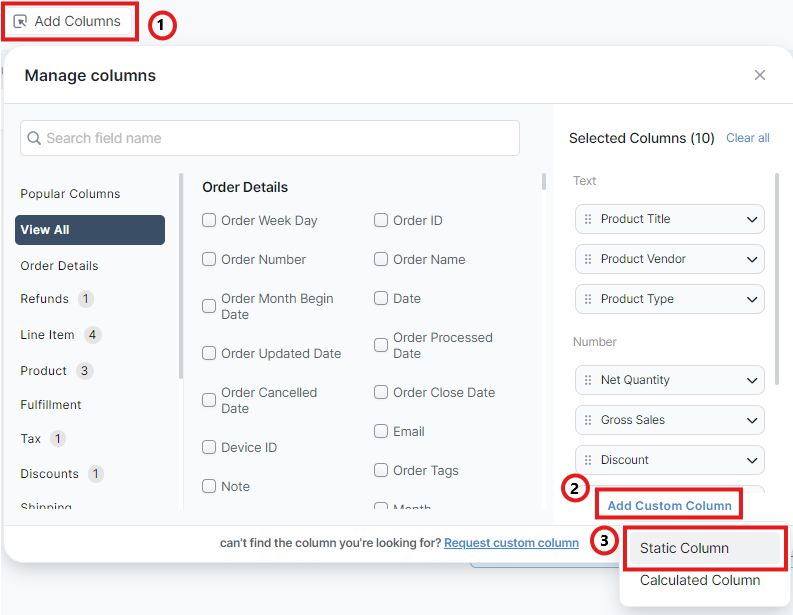
1. Click on **Add Columns** in any report.
2. Click on **Add Custom Column.**
3. Select **Static Column** from the drop-down menu.
4. In the pop-up box, enter your **Field Name** and **Static Value** (fixed input) in the respective sections.
5. Click on **Add** to complete the process.
{% hint style="warning" %}
Remember to **Save** the report after adding the static column to retain it.
{% endhint %}
{% hint style="success" %}
:star2:That's it! You have successfully created a **Static Field** for your report.
{% endhint %}
.gif?alt=media&token=a44d2773-8e46-49c7-850b-d53e9c39e93f)