> For the complete documentation index, see [llms.txt](https://docs.reportpundit.com/llms.txt). Markdown versions of documentation pages are available by appending `.md` to page URLs; this page is available as [Markdown](https://docs.reportpundit.com/knowledge-base/settings/staff-details.md).
# Staff Details
The Staff Details page allows you to manage your Shopify store staff information within Report Pundit. This helps ensure accurate reporting when staff-related data is used in reports.
### Import Staff from Shopify
You can import staff details directly from your **Shopify store** using **two different methods**.
#### How it works
* Choose one of the available import methods
* Staff details are pulled from your Shopify store
* Imported staff members become available in Report Pundit for reporting
The detailed steps for both methods are explained below
## **Import Staff Data from Shopify to Report Pundit**
Report Pundit now makes it easy to import your Shopify staff (order staff) details, even for large teams. Depending on the number of staff in your store, there are two ways to import staff data.
### **Why Import Staff Data?**
Importing staff details allows you to:
* Accurately track orders by staff
* Generate staff-level reports
* Keep your reporting consistent as your team grows
### **Import Options Based on Staff Count**
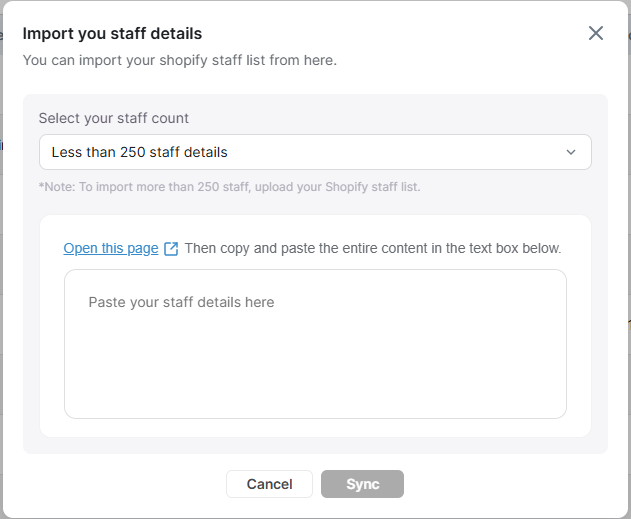
#### **Option 1: Stores with Fewer Than 250 Staff Members**
If your Shopify store has less than 250 staff members, you can import staff data using Shopify’s Staff JSON.
**Steps:**
1. Open the Shopify Staff JSON link provided in Report Pundit.
2. Copy the complete JSON data displayed on the page.
3. Go to Report Pundit → Staff Import.
4. Paste the copied JSON into the input field.
5. Click Import.
✅ Your staff details will be imported instantly.
***
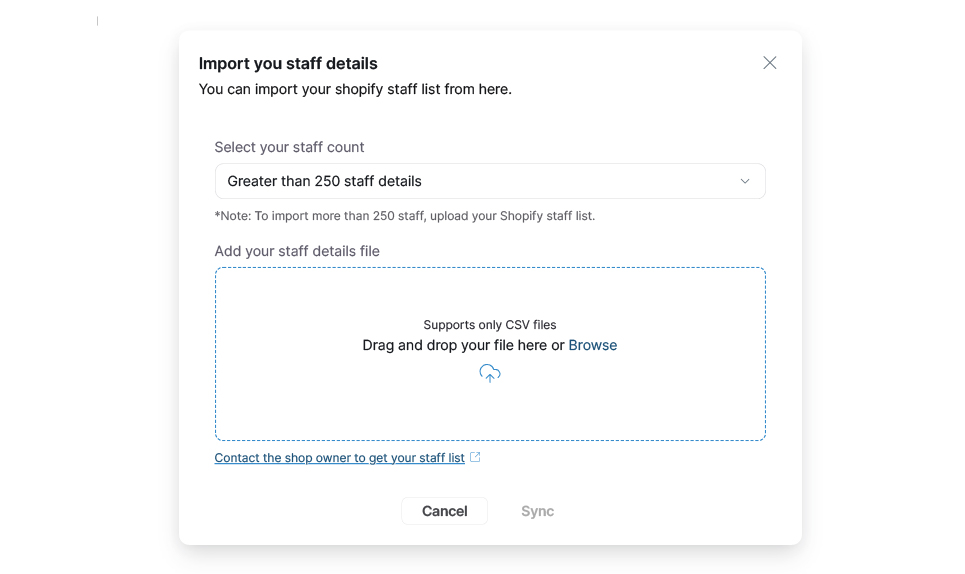
#### **Option 2: Stores with More Than 250 Staff Members**
If your store has 250+ staff members, Shopify limits JSON access. In this case, importing via file upload is the fastest and most reliable method.
**Steps:**
1. Log in to your Shopify Admin.
2. Navigate to Settings → Users.
3. Export the staff users file from Shopify.
4. Go to Report Pundit → Staff Import.
5. Upload the exported file.
6. Click Import to complete the process.
No copy-paste required—perfect for large teams.
***
#### **What Happens After Import?**
* Staff members are automatically mapped in Report Pundit
* Orders can be attributed to staff correctly
* Staff-based reports become available immediately
***
#### **Need Help?**
If you run into any issues during import or need assistance choosing the right method, reach out to the Report Pundit support team—we’re happy to help.